emborado: a sewing and embroidery app, now on Android
Get emborado on Google Play to organize embroidery files, sewing patterns and instructions on the go. Also use the web app on iPhone, iPad and desktop.
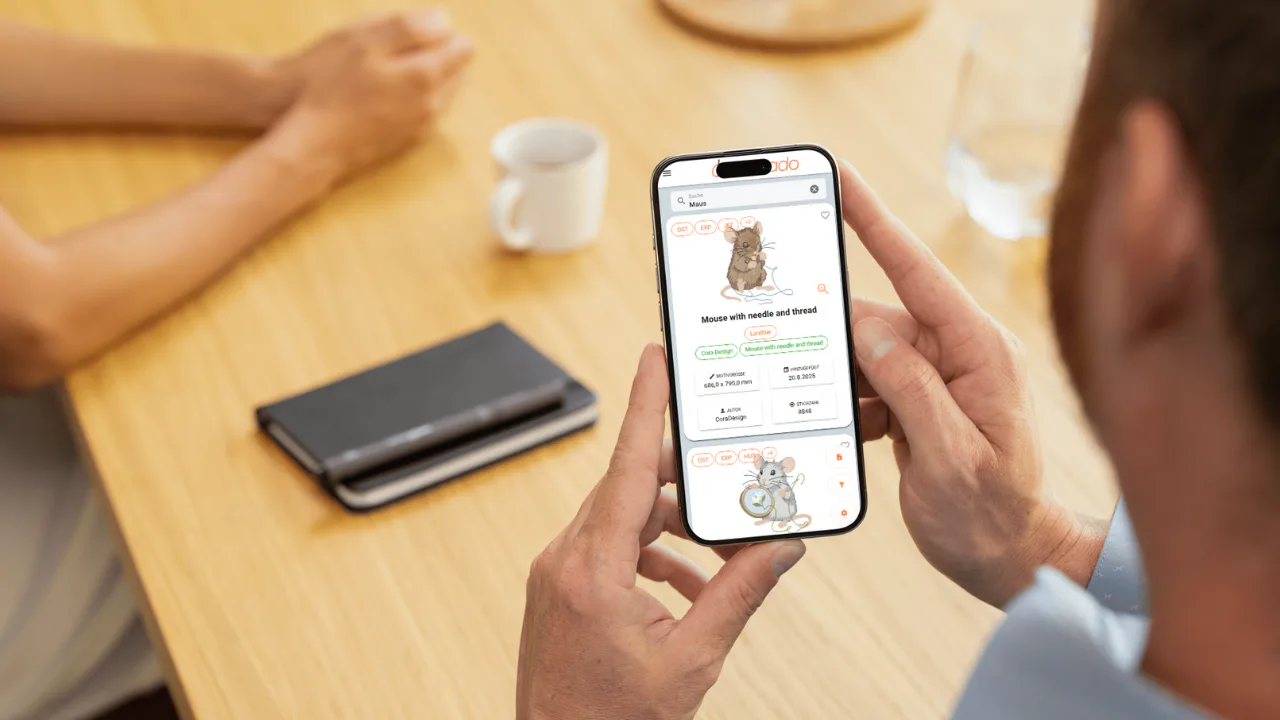
Your embroidery designs, sewing patterns and instructions, always within reach: emborado is now available on Google Play for Android, following its launch over the weekend. Whether you are at your embroidery machine, browsing a fabric store or relaxing on the sofa, the app keeps your digital collection close at hand.
👉 Download emborado on Google Play
Looking for a sewing or embroidery app to keep your existing files organized? emborado helps you find embroidery designs and digital sewing patterns with previews, search and filters. On iPhone, iPad and desktop, you can also access emborado in your browser and install it as a web app.
Install emborado on Android
On your Android phone or tablet, you can now install emborado directly from Google Play:
- Open the emborado listing on Google Play.
- Tap Install and wait for the installation to finish.
- Open emborado using the app icon.
- Sign in with your existing emborado account, or register if you are new to emborado.
Use the same account you use in your browser to access your saved collection. Google Play will show whether the app can be installed on your device.
An embroidery app to keep your designs organized
At your embroidery machine, you want to choose a design and start stitching. With emborado, you can organize your embroidery files, browse previews and search your collection.
- At the embroidery table: Find a design and check details such as dimensions, colors and stitch count.
- When planning a project: Search using keywords, tags or the designer assigned to a design.
- After stitching: Mark designs as already stitched to keep track of the files you have used.
Our guide to managing embroidery designs with emborado explains how to build and search your library. For more about hoop size detection, search and embroidery status, see the October 2026 emborado update.
A sewing app for your patterns and instructions
Having your collection on your phone or tablet is just as useful when you sew. Your digital sewing patterns and their instructions are accessible wherever you need them.
At the fabric store, open a saved instruction file to check the materials your project requires. At your sewing table, follow the next steps on your tablet. Later, browse your pattern collection from the sofa and choose what to sew next.
Our guide to organizing sewing patterns shows you how to build a clear digital pattern library. You can also explore the emborado features for an overview of what is available.
Use emborado as a web app on your computer
On your computer, you can keep using emborado in your browser or install it as a web app with its own icon. This gives you a direct route to your collection without searching for a bookmark.
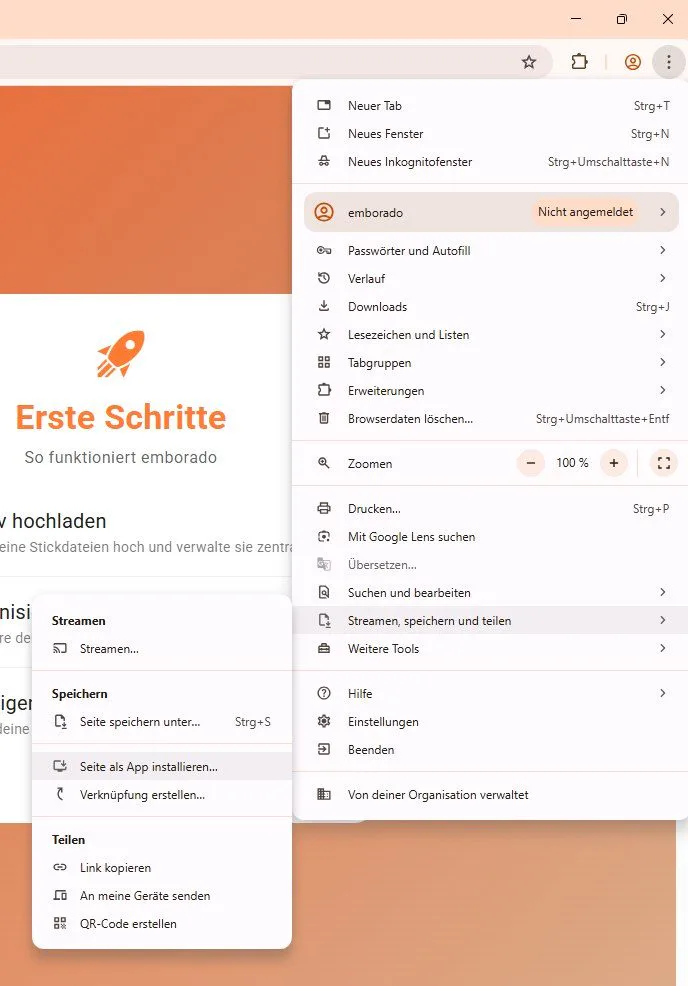
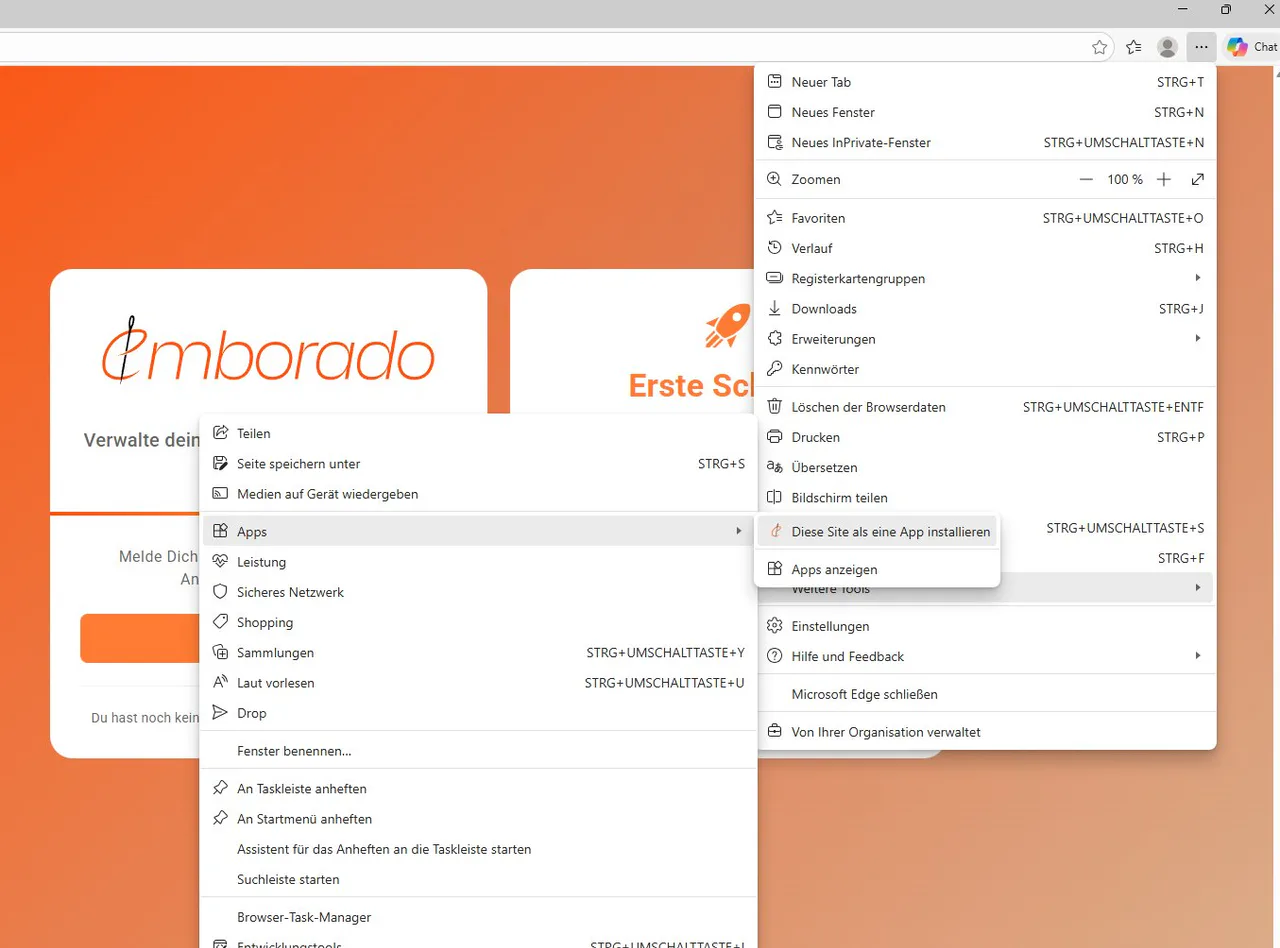
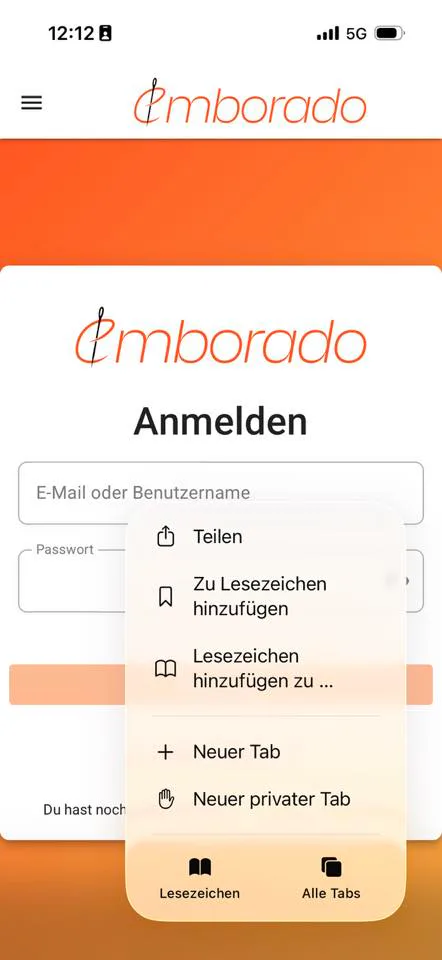
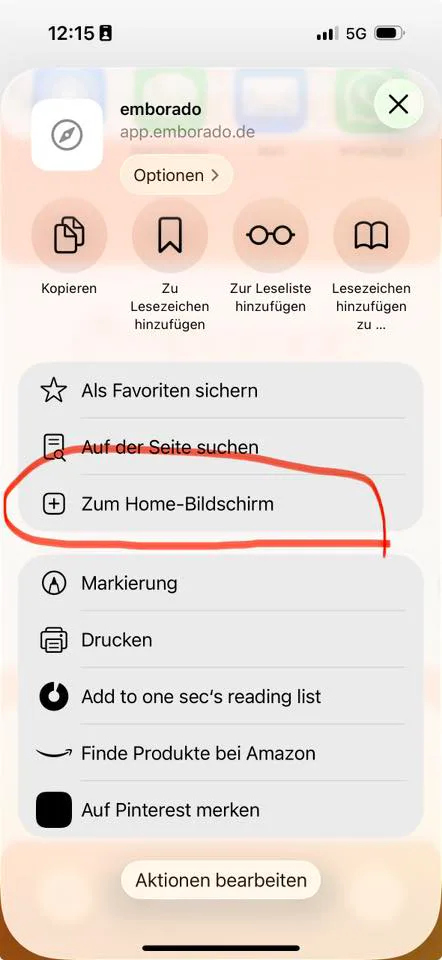
Menu names may vary slightly by browser version and operating system. The screenshots below show the German menus; the instructions use their English equivalents.
Install with Google Chrome
- Open app.emborado.de in Chrome.
- Select the three-dot menu (⋮) at the top right.
- Choose Cast, save, and share → Install page as app.
- Confirm the installation.
Depending on your system, you can then open emborado from your apps list or create a desktop or taskbar shortcut. See Google Chrome Help on web apps for more details.
Install with Microsoft Edge
- Open app.emborado.de in Edge.
- Select the three-dot menu (…) at the top right.
- Choose More tools → Apps → Install this site as an app.
- Confirm the installation.
emborado will open in its own window. You can use Edge’s app management options to create a shortcut or pin the app. The Microsoft guide to installing apps in Edge explains the options.
Add emborado to your iPhone or iPad Home Screen
On iPhone and iPad, you can access your sewing and embroidery files through Safari and add emborado to your Home Screen:
- Open app.emborado.de in Safari.
- Tap Share. Depending on your layout, this is in the page menu or available directly as a Share button.
- Choose Add to Home Screen. You may need to expand the available options first.
- Turn on Open as Web App if that option is shown.
- Name it emborado and tap Add.
You can then open emborado using its Home Screen icon. Apple also provides instructions for iPhone and iPad.
Frequently asked questions about the sewing and embroidery app
Is emborado available on Google Play?
Yes. You can find the Android app under emborado on Google Play. Install it on a compatible Android device and sign in with your emborado account.
Can I use emborado for both sewing patterns and embroidery files?
Yes. emborado has separate areas for embroidery designs and digital sewing patterns. Use the areas that suit your projects and access your files from your phone, tablet or computer.
Do I need a new account for the app?
If you already use emborado, sign in with your existing account. You will have access to the same collection you use in your browser.
Can I try emborado for free?
Yes, you can try emborado within the free file limits. See the pricing overview for current limits and subscription options.
Keep your sewing and embroidery projects within reach
Whether you are searching for a Christmas design, checking instructions at the fabric store or planning your next sewing project, emborado keeps your digital collection easy to access.
👉 Download emborado for Android on Google Play
👉 Try emborado in your browser for free
This article is also available in German.