Why drag and drop is currently disabled in Chrome for emborado
A Chrome-specific drag-and-drop bug can corrupt files from ZIP folders. That is why we temporarily disable drag and drop in Chrome and show safe alternatives.

Why drag and drop is currently disabled in Google Chrome for emborado
For some time now, we have temporarily disabled drag and drop in Google Chrome for emborado.
The reason is not a bug in emborado, but a Chrome-specific bug that, under certain conditions, can pass files from ZIP folders to a website incorrectly during drag and drop. File names and file contents may no longer match, or individual files may be missing.
For an application like emborado, which not only stores embroidery files but also interprets them, this is a serious issue. That is why we decided to disable the affected feature in Chrome for safety reasons until the browser bug is fixed.
What exactly is the problem?
emborado already processes millions of files. A large share of them are embroidery files delivered in ZIP folders. That is exactly why we built the ZIP upload in emborado: users should be able to upload their files as easily as possible without manually extracting and sorting everything first.
During our extensive testing, we found that Google Chrome can run into an issue under certain circumstances when dragging and dropping ZIP folders. The following problems can occur:
- The file name looked correct.
- The file type appeared plausible at first glance.
- But the actual file content did not match the name.
- In some cases, files could be missing from the drop process.
This is especially tricky because the file initially looks like a normal upload file to both frontend and backend. The browser already provides the incorrect combination during the drop. So if Chrome passes a file with the wrong content during drag and drop, a website cannot reliably detect this as long as name, type, and content still appear plausible in principle.
In other words: the problem happens before emborado can properly validate or process the file.
Please support the Chromium issue
We reported the bug and documented it in a reproducible way. Now the topic needs visibility so it can be prioritized in the Chromium project.
If you use emborado or operate web applications yourself where users upload files via drag and drop, your support helps:
Please vote for the Chromium issue:
https://issues.chromium.org/issues/491140861
The more visible the ticket becomes, the greater the chance that the bug will be fixed sooner and Chrome will support drag and drop reliably again.
How we found the Chrome drag-and-drop bug
The path to this insight was technically quite involved.
First, we searched within our own application: upload logic, file structures, ZIP processing, embroidery file analysis, backend validation, original files, and the timing of uploads. Everything was checked more than once.
Only through byte-level analysis did it become clear: the anomaly does not originate in emborado. It originates in the browser’s drag-and-drop behavior.
After that, we reproduced the bug, rebuilt it in a small example project, and filed it as a Chromium issue:
Chromium Issue 491140861: Chrome Drag & Drop bug
The ticket has been accepted. Until the bug is fixed, however, we have to assume that drag and drop in Chrome is not safe enough for certain ZIP scenarios.
What you can do now
You can of course continue using emborado normally. If you have been using Chrome so far, you have several ways to handle the issue.
Option 1: Use emborado with Firefox
Our current recommendation is: Use emborado with Firefox if you want to keep uploading conveniently via drag and drop.
According to our tests, the issue described here is Chrome-specific. With Firefox, you can continue using drag and drop and upload files to emborado as usual.
Option 2: Use the upload buttons in Chrome
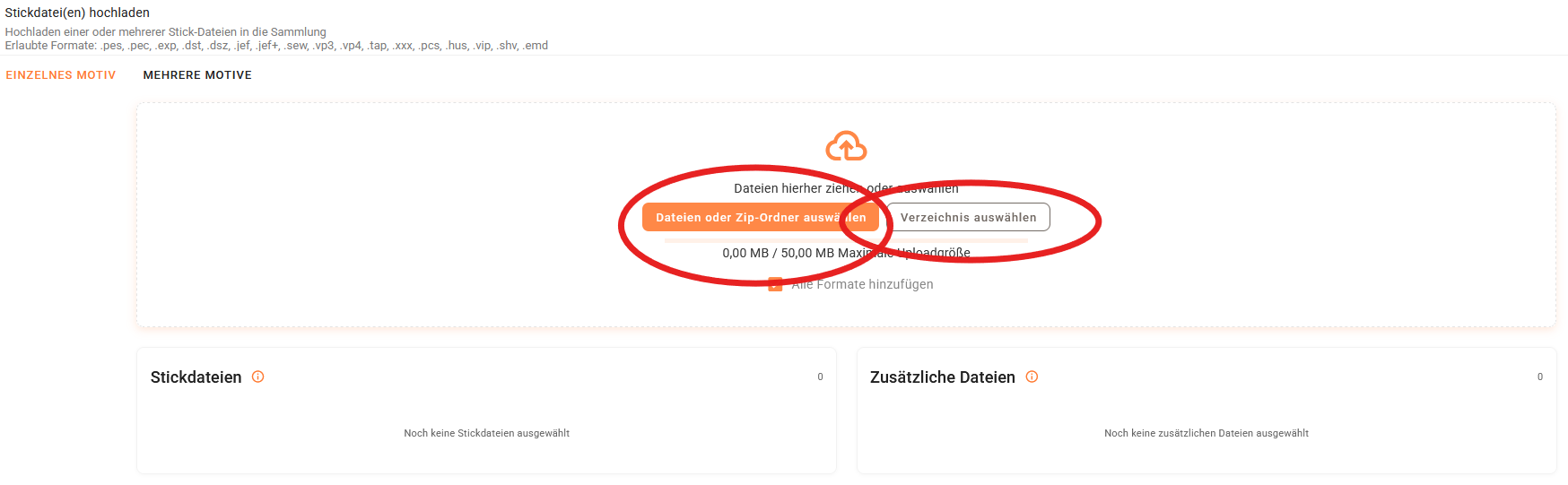
If you want to keep using Google Chrome, please do not use drag and drop. Instead, use the upload buttons in emborado.
When uploading, click the corresponding buttons and select your files or ZIP folders through the file dialog. This avoids the affected drag-and-drop path and is therefore the safe alternative in Chrome.
Our conclusion
We did not disable drag and drop in Chrome because we want to make uploads harder. We disabled it because data integrity is more important than convenience.
Until the Chrome drag-and-drop bug is fixed, the following applies:
- For drag and drop, we currently recommend Firefox.
- In Chrome, please use the upload buttons.
- Please support the Chromium ticket so the issue can be fixed faster.
Thank you for your understanding and your support. We will keep you updated as soon as Chrome drag and drop is safe to use again.